Saturday, March 26, 2011

SQL Server Profiler

SQL Profiler is a powerful tool that allows you to capture and analyse events, such as the execution of a stored procedure, occurring within SQL Server. This information can be used to identify and troubleshoot many SQL Server-related problems.
The inner working of Profiler
The SQL Server Profiler is only a GUI designed to work with another feature of SQL Server call SQL Trace. It is SQL Trace that actually doing most of the work when it comes to capturing SQL Sever events and storing them for later use. SQL Trace is a feature of SQL Server that can be accessed indirectly with the Profiler GUI, system stored procedures, or programmatically using Server Management Objects (SMO).
In essence, SQL Trace is a very simple tool. Its job is just to capture SQL Server-related communication between a client and SQL Server. It acts similarly to a specialized network sniffer that captures traffic on the network related to SQL Server and allows you to see exactly which events are being sent from the client to SQL Server.
Unlike a network sniffer, which allows you to see every byte transversing the network, SQL Trace only captures and process SQL Server-specific events.
SQL Server Profiler Architecture
Figure : The flow of Profiler data from SQL Server events to final output
Profiler terminology
1. Events
SQL Server Profiler allows you to capture over 170 different SQL Server-related events. The execution of a stored procedure is one example of event. An Event Category is a group of related events. The term Event Class refers to an event, and all of the data columns associated with it.
2. Data columns
Every event that can be captured includes a group of related data that describes that event and is stored in what are called data columns.
3. Filters
Filter allow user to tell profiler not to collect the events (rows) that you don’t want to save or view.
4. Trace
A trace includes the events and data columns you collect and is usually stored in a physical file for later examination.

Monday, March 14, 2011

How to Connect to a SQL 2005 Server When You Are Completely Locked Out

I came across the nice article on the SQLServerCentral.com, about how to Connect to a SQL 2005 Server When You Are Completely Locked Out.

http://www.sqlservercentral.com/articles/Administration/68271/

Monday, February 28, 2011

Design Patterns Explained

Design patterns are high-level abstract solution templates. Think of them as blueprints for solutions rather than the solutions themselves. You won’t find a framework that you can simply apply to your application; instead, you will typically arrive at design patterns through refactoring your code and generalizing your problem. Design patterns aren’t just applicable to software development; design patterns can be found in all areas of life from engineering to architecture. In fact, it was the architect Christopher Alexander who introduced the idea of patterns in 1970 to build a common vocabulary for design discussion. He wrote:
The elements of this language are entities called patterns. Each pattern describes a problem that occurs over and over again in our environment and then describes the core of the solution to that problem in such a way that you can use this solution a million times over without ever doing it the same way twice.

The origins of the design patterns that are prevalent in software architecture today were born from the experiences and knowledge of programmers over many years of using object-oriented programming languages.

Necessity
Patterns are essential to software design and development. They enable the expression of intent through a shared vocabulary when problem solving at the design stage as well as within the source code. Patterns promote the use of good object-oriented software design, as they are built around solid object-oriented design principles. Patterns are an effective way to describe solutions to complex problems. With solid knowledge of design patterns, you can communicate quickly and easily with other members of a team without having to be concerned with the low-level implementation details. Patterns are language agnostic; therefore, they are transferable over other object-oriented languages. The knowledge you gain through learning patterns will serve you in any first-class object-oriented language you decide to program in.

Usefulness
The useful and ultimate value of design patterns lies in the fact that they are tried and tested solutions, which gives confidence in their effectiveness. Design patterns are all about the reuse of solutions. All problems are not equal, of course, but if you can break down a problem and find the similarities with problems that have been solved before, you can then apply those solutions. After decades of object-oriented programming, most of the problems you’ll encounter will have been solved countless times before, and there will be a pattern available to assist in your solution implementation. Even if you believe your problem to be unique, by breaking it down to its root elements, you should be able to generalize it enough to find an appropriate solution. The name of the design pattern is useful because it reflects its behavior and purpose and provides a common vocabulary in solution brainstorming. It is far easier to talk in terms of a pattern name than in detail about how an implementation of it would work.
Reference : Professional ASP.NET Design Patterns by Scott Millett

Tuesday, February 8, 2011

CONTEXT_INFO : SQL Server

CONTEXT_INFO() function returns the contenxt_info value that was set for the current session or batch by using the SET CONTEXT_INFO statement. It can associate up to 128 bytes of binary information with the current session or connection.

You can set the context_info using:
SET CONTEXT_INFO { binary_str | @binary_var }
where binary_str is a binary constant / @binary_var is varbinary or binary variable.

In SQL server, session context information is also stored in the context_info columns of the following system views:
  • sys.dm_exec_requests
  • sys.dm_exec_sessions
  • sys.sysprocesses

The preferred way to retrieve the context information for the current session is to use the CONTEXT_INFO() function.

Example:
SET CONTEXT_INFO 0x1111122222
GO
SELECT CONTEXT_INFO()
GO

Usage:
  • Passing information from a stored procedure that performs DML operations to the triggers Read more
  • To make SQL table will never be modified except via a stored procedure Read more

Monday, January 31, 2011

Last Activity - SQL Server Objects

The Dynamic Management View (DMV) sys.dm_db_index_usage_stats can be used to find out the counts of different types of index operations and the time each type of operation was last performed. This view counts every individual seek, scan, lookup or update on the specified object caused by user-submitted queires or by internally generated queries, such as scan for gathering statistics. The counters are initialized to empty whenever the SQL Server (MSSQLSERVER) service is started. In addition, whenever a database is detached or is shut down (for example, because AUTO_CLOSE is set to ON), all rows associated with the database are removed.

Permissions : Requires VIEW SERVER STATE permission.

USE [Test]
GO

/* Cretate Test Table */
CREATE TABLE SampleTest
(   
    Id    INT,
    Val VARCHAR(100)
)
GO

/* Insert data into test table - This will refect in DMV counter */
INSERT INTO SampleTest
SELECT 1, 'First'
UNION ALL
SELECT 2, 'Second'
GO

/* Query to Find out Last Activity on SQL Objects (such as Tables, Views) */
SELECT     OBJECT_NAME(OBJECT_ID) AS ObjectName
        ,DB_NAME(DATABASE_ID) AS DatabaseName
        ,last_user_update
        ,*
FROM    sys.dm_db_index_usage_stats
WHERE   
DATABASE_ID = DB_ID( 'Test')
        AND OBJECT_ID = OBJECT_ID('SampleTest')

Tuesday, January 18, 2011

Life As a C++/MFC Programmer

One vast improvement over raw C/API development is the use of the C++ programming language. In many ways, C++ can be thought of as an object-oriented layer on top of C. Thus, even though C++ programmers benefit from the famed “pillars of OOP” (encapsulation, inheritance, and polymorphism), they are still at the mercy of the painful aspects of the C language (e.g., manual memory management, ugly pointer arithmetic, and ugly syntactical constructs).
Despite its complexity, many C++ frameworks exist today. For example, the Microsoft Foundation Classes (MFC) provide the developer with a set of C++ classes that facilitate the construction of Win32 applications. The main role of MFC is to wrap a “sane subset” of the raw Win32 API behind a number of classes, magic macros, and numerous code-generation tools (a.k.a. wizards). Regardless of the helpful assistance offered by the MFC framework (as well as many other C++-based windowing toolkits), the fact of the matter is that C++ programming remains a difficult and error-prone experience, given its historical roots in C.
Source : Pro C# 2008 and the .NET 3.5 Platform - Andrew Troelsen

Friday, December 31, 2010

TFS : Team Foundation Server

There are many elements, processes, and roles that combine to enable successful team-based software development projects. The core processes include:
  • Development
  • Test
  • Build
  • Deployment
  • Release
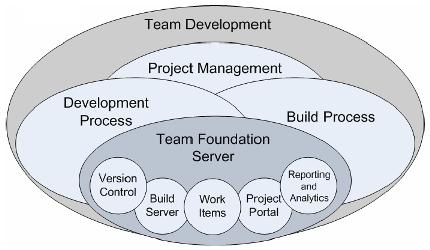
The following diagram illustrates the relationship between typical software development processes relating to team development and how Team Foundation Server can be leveraged to provide horizontal foundational support for these initiatives.

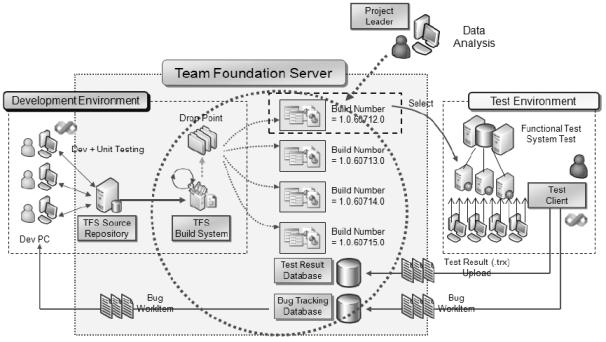
TFS enables a development team to store code in a centrally managed source code repository. You can create builds from this repository by using the build server and you can then distribute these builds to your test team.

Fig : Team Foundation Server Logical Workflow
The test team picks up builds from a drop location and runs them through its testing environment by performing a combination of manual and automated tests. Test results are stored by TFS and are used to provide feedback on the build quality. The test team can also create work items and bugs (a specific type of work item) on which the development team needs to take action. These work items allow the test team to track the work of the development team.
TFS are designed to support the software development life cycle by integrating various aspects of software development such as source control, work tracking, reporting, project management, and automated build process.