Showing posts with label MS SQL. Show all posts

Sunday, July 10, 2016

SQL Server Management Objects (SMO)

SQL Server Management Objects (SMO) are .NET objects introduced by Microsoft as of Microsoft SQL Server 2005, designed to allow for easy and simple programmatic management of Microsoft SQL Server. You can use SMO to build customized SQL Server management applications. The SMO object model extends and supersedes the Distributed Management Objects (SQL-DMO) object model. Compared to SQL-DMO, SMO increases performance, control, and ease of use. Most SQL-DMO functionality is included in SMO, and there are various new classes that support new features in SQL Server. The object model is intuitive and uses SQL-DMO terminology, where it is possible, to help transfer your skills.
New features in SMO SQL Sever 2016 include the following:
  • Cached object model and optimized object instance creation. Objects are loaded only when specifically referenced. Object properties are only partially loaded when the object is created. The remaining objects and properties are loaded when they are referenced directly.
  • Batched execution of Transact-SQL statements. Statements are batched to improve network performance.
  • Capture Transact-SQL statements. Allows any operation to be captured into a script. Management Studio uses this capability to script an operation instead of executing it immediately.
  • Management of SQL Server services with the WMI Provider. SQL Server services can be started, stopped, and paused programmatically.
  • Advanced Scripting. Transact-SQL scripts can be generated to re-create SQL Server objects that describe relationships to other objects on the instance of SQL Server.
  • Use of Unique Resource Names (URNs). A URN allows you to create instances of and reference SMO objects.
SMO also represents as new objects or properties many features and components that were introduced in SQL Server 2005. These new features and components include the following:
  • Table and index partitioning for storage of data on a partition scheme.
  • HTTP endpoints for managing SOAP requests.
  • Snapshot isolation and row level versioning for increased concurrency.
  • XML Schema collection, XML indexes and XML datatype provide validation and storage of XML data. For more information, see XML Schema Collections (SQL Server) and Using XML Schemas.
  • Snapshot databases for creating read-only copies of databases.
  • Service Broker support for message-based communication.
  • Synonym support for multiple names of SQL Server database objects.
  • The management of Database Mail that lets you create e-mail servers, e-mail profiles, and e-mail accounts in SQL Server.
  • Registered Servers support for registering connection information.
  • Trace and replay of SQL Server events.
  • Support for certificates and keys for security control.
  • DDL triggers for adding functionality when DDL events occur.
The SMO namespace is Microsoft.SqlServer.Management.Smo. SMO is implemented as a Microsoft.NET Framework assembly. This means that the common language runtime from the Microsoft.NET Framework version 2.0 must be installed before using the SMO objects. The SMO assemblies are installed by default into the Global Assembly Cache (GAC) with the SQL Server SDK option.

Wednesday, June 29, 2016

SQL SERVER 2016 - JSON Data

JSON is a popular textual data format used for exchanging data in modern web and mobile applications. JSON is also used for storing unstructured data in log files or NoSQL databases. Many REST web services return results formatted as JSON text or accept data formatted as JSON. JSON is also the main format for exchanging data between web pages and web servers using AJAX calls.

SQL Server provides built-in functions and operators for following JSON data manipulation:
  • Parse JSON text and read or modify values.
  • Transform arrays of JSON objects into table format.
  • Use any Transact SQL query on the converted JSON objects.
  • Format the results of Transact-SQL queries in JSON format.

Transform JSON text to relational table:
OPENJSON is table-value function (TVF) that seeks into some JSON text, locate an array of JSON objects, iterate through the elements of array, and for each element generates one row in the output result. This feature will be available in CTP3. One example of OPENJSON function in T-SQL query is shown in the following example:
SELECT Number, Customer, Quantity
FROM OPENJSON (@JSalestOrderDetails, '$.OrdersArray')
WITH (
Number varchar(200),
Customer varchar(200),
Quantity int
) AS OrdersArray

Exporting data as JSON:
First feature that will be available in SQL Server 2016 CTP2 is ability to format query results as JSON text using FOR JSON clause. If you are familiar with FOR XML clause you will easily understand FOR JSON. When you add FOR JSON clause at the end of T-SQL SELECT query, SQL Server will take the results, format them as JSON text, and return it to client. Every row will be formatted as one JSON object, values in cells will be generated as values of JSON objects, and column names or aliases will be used as key names. Below is the syntax:
SELECT column, expression, column as alias
FROM table1, table2, table3
FOR JSON [AUTO | PATH]

Thursday, September 10, 2015

Compress LOB data in the database

SQL Server stores the data in regular B-Tree indexes in three different sets of the data pages called allocation units. The main data row structure and fixed-length data are stored in IN-ROW data pages. Variable-length data greater than 8,000 bytes in size is stored in LOB (large object) pages. Such data includes (max) columns, XML, CLR UDT and a few other data types. Finally, variable-length data, which does not exceed 8,000 bytes, is stored either in IN-ROW data pages when it fits into the page, or in ROW-OVERFLOW data pages.

Enterprise Edition of SQL Server allows you to reduce the size of the data by implementing data compression. However, data compression is applied to IN-ROW data only and it does not compress ROW-OVERFLOW and LOB data. Any large objects that do not fit into IN-ROW data pages remain uncompressed.

The approach to address such an overhead is manually compress LOB data in the code. You can create the methods to compress and decompress data utilizing one of the classes from System.IO.Compression namespace, for example using GZipStream or DeflateStream classes. Moreover, that method could be implemented in CLR stored procedures and used directly in T-SQL code. The drawback to this approach, compression is CPU intensive. It is better to run such code on the client whenever it is possible. The second important consideration is performance. Obviously, decompression adds an overhead, which you would like to avoid on the large scope.

Compressing LOB data in the database could help you to significantly reduce the database size in the large number of cases. However, it adds an overhead of compressing and decompressing data. In some cases, such overhead would be easily offset by the smaller data size, less I/O and buffer pool usage.

Monday, July 13, 2015

MS SQL Server 2016

SQL Server 2016 delivers breakthrough mission-critical capabilities with in-memory performance and operational analytics built-in. Comprehensive security features like new Always Encrypted technology helps protect your data at rest and in motion, and a world class high availability and disaster recovery solution adds new enhancements to AlwaysOn technology.
Benefits:
  • Enhanced in-memory performance provide up to 30x faster transactions, more than 100x faster queries than disk based relational databases and real-time operational analytics
  • New Always Encrypted technology helps protect your data at rest and in motion, on-premises and in the cloud, with master keys sitting with the application, without application changes
  • Built-in advanced analytics– provide the scalability and performance benefits of building and running your advanced analytics algorithms directly in the core SQL Server transactional database
  • Business insights through rich visualizations on mobile devices with native apps for Windows, iOS and Android
  • Simplify management of relational and non-relational data with ability to query both through standard T-SQL using PolyBase technology
  • Stretch Database technology keeps more of your customer’s historical data at your fingertips by transparently stretching your warm and cold OLTP data to Microsoft Azure in a secure manner  without application changes
  • Faster hybrid backups, high availability and disaster recovery scenarios to backup and restore your on-premises databases to Microsoft Azure and place your SQL Server AlwaysOn secondaries in Azure

Key Capabilities in SQL Server 2016 CTP2:
Always Encrypted
Always Encrypted, based on technology from Microsoft Research, protects data at rest and in motion. With Always Encrypted, SQL Server can perform operations on encrypted data and best of all, the encryption key resides with the application in the customers trusted environment. Encryption and decryption of data happens transparently inside the application which minimizes the changes that have to be made to existing applications.
Stretch Database
This new technology allows you to dynamically stretch your warm and cold transactional data to Microsoft Azure, so your operational data is always at hand, no matter the size, and you benefit from the low cost of Azure.  You can use Always Encrypted with Stretch Database to extend data in a more secure manner for greater peace of mind.
Real-time Operational Analytics & In-Memory OLTP
For In-Memory OLTP, which customers today are using for up to 30x faster transactions, you will now be able to apply this tuned transaction performance technology to a significantly greater number of applications and benefit from increased concurrency.  With these enhancements, we introduce the unique capability to use our in-memory columnstore delivering 100X faster queries on top of in-memory OLTP to provide real-time operational analytics while accelerating transaction performance.
Additional capabilities in SQL Server 2016 CTP2 include:
  • PolyBase – More easily manage relational and non-relational data with the simplicity of T-SQL.
  • AlwaysOn Enhancements – Achieve even higher availability and performance of your secondaries, with up to 3 synchronous replicas, DTC support and round-robin load balancing of the secondaries.
  • Row Level Security – Enables customers to control access to data based on the characteristics of the user. Security is implemented inside the database, requiring no modifications to the application.
  • Dynamic Data Masking – Supports real-time obfuscation of data so data requesters do not get access to unauthorized data.  Helps protect sensitive data even when it is not encrypted.
  • Native JSON support – Allows easy parsing and storing of JSON and exporting relational data to JSON.
  • Temporal Database support – Tracks historical data changes with temporal database support.
  • Query Data Store – Acts as a flight data recorder for a database, giving full history of query execution so DBAs can pinpoint expensive/regressed queries and tune query performance.
  • MDS enhancements – Offer enhanced server management capabilities for Master Data Services.
  • Enhanced hybrid backup to Azure – Enables faster backups to Microsoft Azure and faster restores to SQL Server in Azure Virtual Machines.  Also, you can stage backups on-premises prior to uploading to Azure.

Monday, December 9, 2013

Hekaton : In-Memory Optimization

Hekaton : The codename for a Microsoft project that will provide support for mixing in-memory database tables with more traditional on-disk tables in the same database. These hybrid databases will be able to dynamically handle both in-memory and on-disk storage in the same database for optimal performance and reliability. Traditional RDBMS architecture was designed when memory resources were expensive, and was optimized for disk I/O. Modern hardware has much more memory, which affects database design principles dramatically. Modern design can now optimize for a working set stored entirely in main memory. Hekaton fully provides ACID database properties.
Project Hekaton will enable Microsoft to compete in the in-memory database market with products like Oracle Database's Exadata and Exalytics appliance options and SAP Hana.
This SQL Server In-memory OLTP capability is released in SQL 2014 version. In-Memory OLTP is a memory-optimized OLTP database engine for SQL Server. Depending on the reason for poor performance with your disk-based tables, In-Memory OLTP can help you achieve significant performance and scalability gains by using,
  • Algorithms that are optimized for accessing memory-resident data.
  • Optimistic concurrency control that eliminates logical locks.
  • Lock free objects are used to access all data. Threads that perform transactional work don’t use locks or latches for concurrency control.
  • Natively compiled stored procedures result in orders of magnitude reduction in the engine code path.
Use of main memory can result in a few percentage points of performance improvement, to 20 times performance improvement.

Wednesday, October 9, 2013

Microsoft SQL Server 2014

Microsoft SQL Server 2014 brings to market lots of new features and enhancements over prior versions. SQL Server 2014 delivers mission critical performance across all workloads with in-memory built-in, faster insights from any data with familiar tools, and a platform for hybrid cloud enabling organizations to easily build, deploy, and manage solutions that span on-permises and cloud.
SQL Server 2014 delivers new in-memory capabilities built into the core database for OLTP and data warehousing, which complement our existing in-memory data warehousing and BI capabilities for the most comprehensive in-memory database solution in the market.
The Power of SQL Server 2014 includes:
Performance Enhancements:
  • In-Memory OLTP: Average 10x and up to 50x performance gains
  • Enhanced In-Memory ColumnStore for DW: Updatable, faster, better compression
  • In-Memory BI with PowerPivot: Fast insights
  • Buffer Pool Extension to SSDs: Faster paging
  • Enhanced Query Processing: Faster performance without any app changes
Data Retrieval Enhancements:
  • Power Query (codename “Data Explorer”): Easy access to internal and external data
  • Power Map (codename “Geo Flow”): Richer insights with 3D visualization
  • Parallel Data Warehouse with Polybase: Query big data with T-SQL
  • Data Mining Add-ins for Excel: Predictive analytics
Cloud based Enhancements:
  • Simplified cloud Backup: Reduce CAPEX & OPEX
  • Windows Azure SQL Database service: Develop new variable demand cloud apps quickly with HA built-in
  • HA/Always On in Azure: Helps to handle disaster recovery
  • Extend on-premises apps to the cloud: Gain cloud scale on demand
You can download  Microsoft SQL Server 2014 Community Technology Preview 1 (CTP1) at below location:  

Thursday, August 23, 2012

T-SQL Syntax

Recently I have came across very good question on SQLServerCentral.com
Different T-SQL constructs can assign a value to a regular identifier with a leading '@' without using SET nor SELECT :
  1. An Input argument to a Procedure or Function - http://msdn.microsoft.com/en-us/library/ms187926
  2. An Output argument to a Procedure - http://msdn.microsoft.com/en-us/library/ms187926
  3. EXECUTE a Function: EXEC @return = udfFunct() - http://msdn.microsoft.com/en-us/library/ms188332
  4. The Stored Procedure return status: EXEC @status = uspProc (This is very different from a Function return.) - http://msdn.microsoft.com/en-us/library/ms188332
  5. The OUTPUT clause: OUTPUT INTO @tablevar (Could count this 4 times but it is really one construct) http://msdn.microsoft.com/en-us/library/ms177564
  6. RECEIVE .... FROM INTO @tablevar - http://msdn.microsoft.com/en-us/library/ms186963.aspx
  7. FETCH NEXT FROM cursor INTO @varname - http://msdn.microsoft.com/en-us/library/ms180152
  8. DECLARE @varname INT = 0; - http://msdn.microsoft.com/en-us/library/ms188927

Monday, July 23, 2012

#temp table Vs @table variable

Some facts about Table Variables and Temp Tables are:
  • You can create local and global temporary tables. Local temporary tables (#table_name) are visible only in the current session, and global temporary tables (##table_name) are visible to all sessions. 
  • Table Variables and Temp Tables both use the tempdb database.
  • Table variables are Transaction neutral. They are variables and thus aren't bound to a transaction.
  • Temp tables behave same as normal tables and are bound by transactions.
  • Assignment operation between table variables is not supported.
  • Clustered indexes can be created on both table variables and temporary tables.
  • Both are logged in the transaction log.
  • Temporary tables cannot be partitioned.
  • Table variables are only allowed in SQL Server 2000+, with compatibility level set to 80 or higher.
Difference:
#temp table @table variable
You can truncate a temp table. You cannot truncate a table variable.
You can alter temp table. Table variables cannot be altered after they have been declared.
One of the most valuable assets of a temp table is the ability to add either a clustered or non-clustered index. You cannot explicitly add an index to a table variable, however you can create a system index through a PRIMARY KEY CONSTRAINT, and you can add as many indexes via UNIQUE CONSTRAINTs as you like.
Temp tables can be used in the following situations:
INSERT #temp EXECsp_someProcedure
SELECT * INTO #temp FROM someTable
You cannot use a table variable in either of the following situations:
INSERT @table EXECsp_someProcedure
SELECT * INTO @table FROM someTable
You cannot create temp tables inside user-defined function. You can declare table variable inside user-defined function.
Temp tables allow for the auto-generated statistics to be created against them. The system will not generate automatic statistics on table variables. Likewise, you cannot manually create statistics
Statistics generated on temp table, help the optimizer to determine cardinality. A table variable will always have a cardinality of 1, because the table doesn'texist at compile time.
Temp tables are automatically dropped when they go out of scope, unless explicitly dropped by using DROP TABLE. You cannot drop a table variable when it is no longer necessary. They are cleaned up automatically at the end of the function, stored procedure, or batch in which they are defined.
Temp table can be referenced by its name or by an alias, except in the FROM clause.
e.g.: SELECT id FROM #t1 t INNER JOIN #t2 ON t.id = #t2.id
Table variables must be referenced by an alias, except in the FROM clause.
e.g.: SELECT id FROM @foo f INNER JOIN #foo ON f.id = #foo.id
Temp tables are visible to the calling procedure in the case of nested procs. Table variables are not visible to the calling procedure in the case of nested procs.
Use of temp table in stored procedure can cause stored procedure recompilations. Table variables used in stored procedures result in fewer recompilations of the stored procedures than when temporary tables are used
Temp tables are involved in SQL transactions. Transactions involving table variables last only for the duration of an update on the table variable. Thus, table variables require less locking and logging resources.
Temp tables are preferred when cost-based choices are required. This typically includes queries with joins, parallelism decisions, and index selection choices. Table variables are not supported in the SQL Server optimizer's cost-based reasoning model. Therefore, they should not be used when cost-based choices are required to achieve an efficient query plan.
Only static tables and temporary tables support the statement "SET IDENTITY_INSERT ON".The table variable does not support the statement "SET IDENTITY_INSERT ON".

Wednesday, May 30, 2012

Features of SQL Server 2012

This latest release of the SQL Server presents new features and improvements that increase the power and efficiency of architects, developers, and administrators who design, develop, and maintain data storage systems.
  • Availability Enhancements
AlwaysOn SQL Server Failover Cluster Instances
AlwaysOn Failover Cluster Instances leverages Windows Server Failover Clustering(WSFC) functionality to provide local high availability through redundancy at the server-instance level - a failover cluster instance(FCI).

AlwaysOn Availability Groups
With AlwaysOn, users will be able to fail over multiple databases in groups instead of individually. Also, secondary copies will be readable, and can be used for database backups.
  • Manageability Enhancements
Manageability of the SQL Server 2012 Database Engine is improved by enhancement to tools and monitoring features listed below:
    SQL Server Management Studio
    Startup Option
    Contained Databases
    Data-tier Applications
    Windows PowerShell
    BCP Utility
    sqlcmd.exe
    Database Engine Tuning Advisor
  • Programmability Enhancements
Sequences
Sequence is a user defined object that generates a sequence of a number.

Ad-Hoc Query Paging
The Order By option in the SQL SELECT statement has been enhanced in SQL Server 2012. Using a combination of OFFSET and FETCH along with ORDER BY gives you control of paging through a result set. Using this technique can really help performance by bring back only the results you want to show to your users when they are needed.

Full Text Search
The Full Text Search in SQL Server 2012 has been enhanced by allowing you to search and index data stored in extended properties or metadata.
  • Scalability and Performance Enhancements
Scalability and performance enhancements in the Database Engine includes:
    Columnstore Indexes
    Online Index Create, Rebuild, and Drop
    Partition Support Increased
    FILESTREAM Filegroups Can Contain Multiple Files
  • Security Enhancements
Security enhancements in the SQL Server Database Engine include provisioning during setup, new SEARCH PROPERTY LIST permissions, new user-defined server roles, and new ways of managing server and database roles.
  • Resource Governor Enhancements
The enhancements to the Resource Governor enable you to more effectively govern performance in multi-tenancy environments like private cloud. The enhancements include support for 64 resource pools, greater CPU usage control, and resource pool affinity for partitioning of physical resources and predictable resource allocation.


Monday, April 2, 2012

Undocumented sp_msforeachtable, sp_msforeachdb procedure

As database administrators or developers, sometimes we need to perform an action on all of the tables within a database or on all the databases within a instance. Microsoft SQL Server provides two undocumented stored procedures designed for iteration that allow you to process through all tables in a database, or all databases in a SQL Server instance. The first stored procedure, "sp_msforeachtable" allows you to easily process some code against every table in a single database. The other stored procedure, "sp_msforeachdb" will execute a T-SQL statement against every database associated with the current SQL Server instance.
 
For example, the following script checks the integrity of each table in the AdventureWorks database using the DBCC CHECKTABLE command. Notice that a [?] is used as a placeholder for the table name in the SQL statement.
USE AdventureWorks;
EXECUTE sp_msforeachtable 'DBCC CHECKTABLE ([?])';
 
As another example, you can sp_msforeachdb procedure to find all the stored procedures in all available databases on the instance which have the word 'RPT' in their definition by running the following command.
EXECUTE sp_msforeachdb 'SELECT ''?'' AS DB, SPECIFIC_NAME, OBJECT_DEFINITION(OBJECT_ID(SPECIFIC_NAME)) FROM [?].INFORMATION_SCHEMA.ROUTINES WHERE OBJECT_DEFINITION(OBJECT_ID(SPECIFIC_NAME)) LIKE ''%RPT%''';

Some level of testing and care should be taken when using undocumented code from Microsoft. Since these stored procedures are not documented, it means that Microsoft might change this code with any new release or patch without notifying customers.

Wednesday, January 25, 2012

Concurrent Administrative Operations

Not all administrative tasks are allowed to run concurrently. In the table below, a black circle indicates two operations that cannot run in a database at the same time.
Grid showing tasks that can run concurrently
File shrink operations spend most processing time reallocating pages into areas retained after the shrink has completed; it then attempts to change the file size only as the last step. File shrink operations can be started while a backup is running, provided that the backup finishes before the file shrink operation attempts to change the size of the files.

Source : http://technet.microsoft.com/en-us/library/ms189315.aspx

Tuesday, January 17, 2012

SQL Server : Protocols

When an application communicates with the Database Engine, the application programming interfaces (APIs) exposed by the protocol layer formats the communication using a Microsoft-defined format called a tabular data stream (TDS) packet. The SQL Server Network Interface (SNI) protocol layer on both the server and client computers encapsulates the TDS packet inside a standard communication protocol, such as TCP/IP or Named Pipes. On the server side of the communication, the network libraries are part of the Database Engine. On the client side, the network libraries are part of the SQL Native Client. The configuration of the client and the instance of SQL Server determine which protocol is used. SQL Server can be configured to support multiple protocols simultaneously, coming from different clients. Each client connects to SQL Server with a single protocol. If the client program does not know which protocols SQL Server is listening on, you can configure the client to attempt multiple protocols sequentially. The following protocols are available:

Shared Memory The simplest protocol to use, with no configurable settings. Clients using the Shared Memory protocol can connect only to a SQL Server instance running on the same computer, so this protocol is not useful for most database activity. Clients using MDAC 2.8 or earlier cannot use the Shared Memory protocol. If such a connection is attempted, the client is switched to the Named Pipes protocol.

Named Pipes A protocol developed for local area networks (LANs). A portion of memory is used by one process to pass information to another process, so that the output of one is the input of the other. The second process can be local (on the same computer as the first) or remote (on a networked computer).

TCP/IP The most widely used protocol over the Internet. TCP/IP can communicate across interconnected networks of computers with diverse hardware architectures and operating systems. It includes standards for routing network traffic and offers advanced security features. Enabling SQL Server to use TCP/IP requires the most configuration effort, but most networked computers are already properly configured.

Virtual Interface Adapter (VIA) A protocol that works with VIA hardware. This is a specialized protocol; configuration details are available from your hardware vendor.

Tuesday, November 15, 2011

SQL Server : Covering Index

Covering Index term is used to describe a certain technique that is used to improve performance. It does not mean a separate kind of index having a different internal structure.
      A covering index is a form of a composite index, includes all of the columns referenced in the SELECT, JOIN and WHERE clauses of a query. Because of this, the index contains the data you are looking for and SQL Server doesn’t have to look up the actual data in the table, reducing logical and/or physical I/O, and boosting performance.

On the other hand, if the covering index gets too big (has too many columns), this could actually increase I/O and degrade performance. Generally, when creating covering indexes, follow these guidelines:
  • If the query or queries you run using the covering index are seldom run, then the overhead of the covering index may outweigh the benefits it provides.
  • The covering index should not add significantly to the size of the key. If it does, then it its use may outweigh the benefits it provides.
  • The covering index must include all columns found in the SELECT list, the JOIN clause, and the WHERE clause.
To determine if a covering index could help a query’s performance is to create a graphical query execution plan in Query Analyzer or Management Studio and check for any Bookmark Lookups (RID or Key) being performed. Essentially, a Bookmark Lookup is indicate that the Query Processor had to look up the row columns it needs from a table or a clustered index, instead of being able to read it directly from a non-clustered index. Bookmark Lookups can reduce query performance because they produce extra disk I/O to retrieve the column data.One way to avoid a Bookmark Lookup is to create a covering index. This way, all the columns from the query are available directly from the non-clustered index, which means that Bookmark Lookups are unnecessary, which reduces disk I/O and helps to boost performance.

Example: (specifying the index explicitly in the query, forced SQL Server to use the non-clustered AK_Employee_NationalIDNumber index)
Query 2 is a covered query, a query where all the columns in the query's result set are pulled from non-clustered indexes.

Tuesday, October 4, 2011

SQL Collation

I came across very interesting question related to SQL Collation on SQLServerCentral.com.

Question: You administer two SQL Server 2005 SP3 installations at Niagara Falls, one on the US side and one on the Canadian side. Each server instance was installed with default settings on a Windows machine set to the proper regional settings for that country. You execute the following script on both servers:
DECLARE @var VARCHAR(MAX);
SET @var = 'Hello World';
SELECT REPLACE(@var, CHAR(0), '')
What is the result on each server?

Correct answer: US: 'Hello World'; Canada: [server hangs]

Explanation: The key to this question is the default collation each server will be set to based on the regional settings of the machine:
    English (United States): SQL_Latin1_General_CP1_CI_AS
    English (Canada): Latin1_General_CI_AS
This only happens with a varchar(max) value in the first argument of the REPLACE() function. If you alter the script to use an nvarchar, or a varchar(x), or eliminate the variable entirely and simply run the REPLACE() on the string itself (without casting the string as a varchar(max)), both servers return 'Hello World'. The same behavior can be reproduced on a single server by specifying the collation when casting 'Hello World' to varchar(max):
SELECT REPLACE(CAST('Hello World' COLLATE SQL_Latin1_General_CP1_CI_AS AS VARCHAR(MAX)), CHAR(0), ''); --returns 'Hello World'
SELECT REPLACE(CAST('Hello World' COLLATE Latin1_General_CI_AS AS VARCHAR(MAX)), CHAR(0), ''); --hangs
Click here for more information on SQLServerCentral.com

Thursday, September 29, 2011

Working with SQL Server System Databases

This post will brief about the SQL Server system databases.
SQL Server System Databses:
  •  master
The master database records all of the system level information for a SQL Server system. It records all login accounts and all system configuration settings. master is the database that records the existence of all other databases, including the location of the database files. master records the initialization information for SQL Server.
  • tempdb
The tempdb holds all temporary tables and temporary stored procedures. It also fills any other temporary storage needs such as work tables generated by SQL Server. It is used to hold the temporary user objects that are explicitly created, such as: global or local temporary tables, temporary stored procedures, table variables, or cursors and internal objects that are created by the SQL Server Database Engine, for example, work tables to store intermediate results for spools or sorting.
Operations within tempdb are minimally logged. This enables transactions to be rolled back. tempdb is re-created every time SQL Server is started so that the system always starts with a clean copy of the database.
  • model
The model database is used as the template for all databases created on an instance of SQL Server. Because tempdb is created every time SQL Server is started, the model database must always exist on a SQL Server system.
  • msdb
The msdb database is used by SQL Server Agent for scheduling alerts and jobs and by other features such as Service Broker and Database Mail.

Restrictions on these databases:


master

tempdb

model

msdb

Adding filegroups


Backing up or restoring the database


Changing collation. The default collation is the server collation


Changing the database owner (owned by dbo)


Creating a full-text catalog or full-text index


Creating triggers on system tables in the database


Creating a database snapshot


Dropping the database


Dropping the guest user from the database


Enabling change data capture


Participating in database mirroring


Removing the primary filegroup, primary data file, or log file


Renaming the database or primary filegroup


Running DBCC CHECKALLOC


Running DBCC CHECKCATALOG


Setting the database to OFFLINE


Setting the database or primary filegroup to READ_ONLY


Creating procedures, views, or triggers using the WITH ENCRYPTION option


NOTE : The encryption key is tied to the database in which the object is created. Encrypted objects created in the model database can only be used in model.

Tuesday, May 3, 2011

Features Supported by the Editions of SQL Server 2008

Here is link where you can find all the features supported by various editions of SQL Server 2008:
    http://msdn.microsoft.com/en-us/library/cc645993%28v=SQL.100%29.aspx


Monday, April 18, 2011

Evolution of Information Processing

The Decision Support System (DSS) was introduced at very early days of computer and information systems, and thats continues till today.


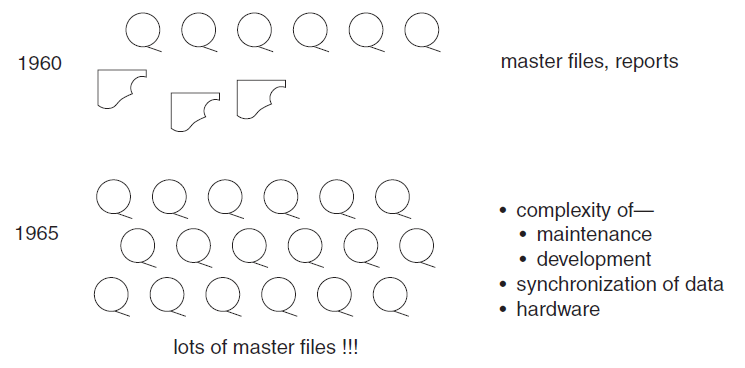
In the early 1960s, the world of computation consisted of creating individual applications that were run using master files. The master files were housed on magnetic tape, which were good for storing large volume of data cheaply, but the drawback was that they had to be accessed sequentially. In short order, the problems of master files—problems inherent to the medium itself—became stifling.


By 1970, the day of a new technology for the storage and access of data had dawned i.e. disk storage, or direct access storage device (DASD). Disk storage was fundamentally different from magnetic tape storage in that data could be accessed directly on DASD.

With DASD came a new type of system software known as a database management system (DBMS). The purpose of the DBMS was to make it easy for the programmer to store and access data on DASD. In addition, the DBMS took care of such tasks as storing data on DASD, indexing data, and so forth. With DASD and DBMS came a technological solution to the problems of master files. And with the DBMS came the notion of a “database.”


By the mid-1970s, online transaction processing (OLTP) made even faster access to data possible, opening whole new vistas for business and processing.


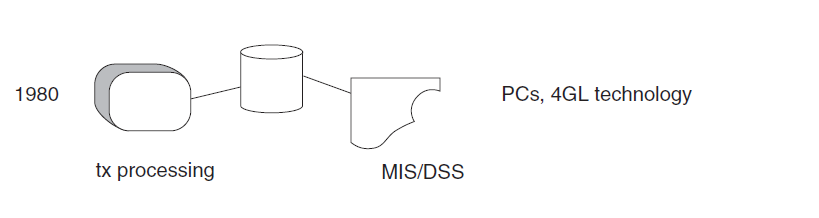
By the 1980s, more new technologies, such as PCs and fourth-generation languages (4GLs), began to surface. The end user began to assume a role previously unfathomed—directly controlling data and systems—a role previously reserved for the data processor. With PCs and 4GL technology came the notion that more could be done with data than simply processing online transactions.


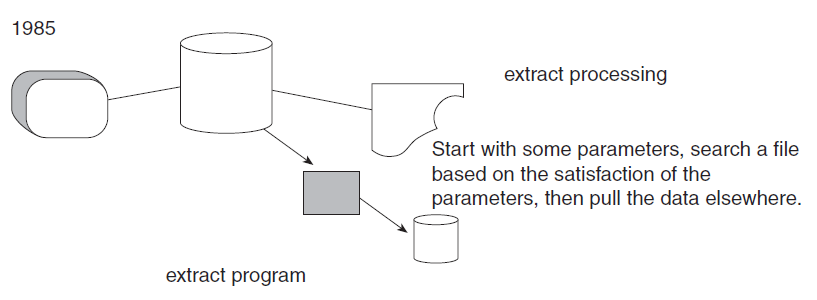
Shortly after the advent of massive OLTP systems, an innocuous program for “extract” processing began to appear. The extract program is the simplest of all programs. It rummages through a file or database, uses some criteria for selecting data, and, on finding qualified data, transports the data to another file or database.
The extract program became very popular, for at least two reasons:
  • Because extract processing can move data out of the way of high performance online processing, there is no conflict in terms of performance when the data needs to be analyzed.
  • When data is moved out of the operational, transaction-processing domain with an extract program, a shift in control of the data occurs. The end user then owns the data once he or she takes control of it. For these (and probably a host of other) reasons, extract processing was soon found everywhere.

Saturday, March 26, 2011

SQL Server Profiler

SQL Profiler is a powerful tool that allows you to capture and analyse events, such as the execution of a stored procedure, occurring within SQL Server. This information can be used to identify and troubleshoot many SQL Server-related problems.
The inner working of Profiler
The SQL Server Profiler is only a GUI designed to work with another feature of SQL Server call SQL Trace. It is SQL Trace that actually doing most of the work when it comes to capturing SQL Sever events and storing them for later use. SQL Trace is a feature of SQL Server that can be accessed indirectly with the Profiler GUI, system stored procedures, or programmatically using Server Management Objects (SMO).
In essence, SQL Trace is a very simple tool. Its job is just to capture SQL Server-related communication between a client and SQL Server. It acts similarly to a specialized network sniffer that captures traffic on the network related to SQL Server and allows you to see exactly which events are being sent from the client to SQL Server.
Unlike a network sniffer, which allows you to see every byte transversing the network, SQL Trace only captures and process SQL Server-specific events.
SQL Server Profiler Architecture
Figure : The flow of Profiler data from SQL Server events to final output
Profiler terminology
1. Events
SQL Server Profiler allows you to capture over 170 different SQL Server-related events. The execution of a stored procedure is one example of event. An Event Category is a group of related events. The term Event Class refers to an event, and all of the data columns associated with it.
2. Data columns
Every event that can be captured includes a group of related data that describes that event and is stored in what are called data columns.
3. Filters
Filter allow user to tell profiler not to collect the events (rows) that you don’t want to save or view.
4. Trace
A trace includes the events and data columns you collect and is usually stored in a physical file for later examination.

Monday, March 14, 2011

How to Connect to a SQL 2005 Server When You Are Completely Locked Out

I came across the nice article on the SQLServerCentral.com, about how to Connect to a SQL 2005 Server When You Are Completely Locked Out.

http://www.sqlservercentral.com/articles/Administration/68271/

Tuesday, February 8, 2011

CONTEXT_INFO : SQL Server

CONTEXT_INFO() function returns the contenxt_info value that was set for the current session or batch by using the SET CONTEXT_INFO statement. It can associate up to 128 bytes of binary information with the current session or connection.

You can set the context_info using:
SET CONTEXT_INFO { binary_str | @binary_var }
where binary_str is a binary constant / @binary_var is varbinary or binary variable.

In SQL server, session context information is also stored in the context_info columns of the following system views:
  • sys.dm_exec_requests
  • sys.dm_exec_sessions
  • sys.sysprocesses

The preferred way to retrieve the context information for the current session is to use the CONTEXT_INFO() function.

Example:
SET CONTEXT_INFO 0x1111122222
GO
SELECT CONTEXT_INFO()
GO

Usage:
  • Passing information from a stored procedure that performs DML operations to the triggers Read more
  • To make SQL table will never be modified except via a stored procedure Read more