Friday, December 31, 2010

TFS : Team Foundation Server

There are many elements, processes, and roles that combine to enable successful team-based software development projects. The core processes include:
  • Development
  • Test
  • Build
  • Deployment
  • Release
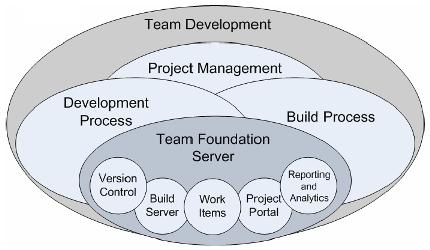
The following diagram illustrates the relationship between typical software development processes relating to team development and how Team Foundation Server can be leveraged to provide horizontal foundational support for these initiatives.

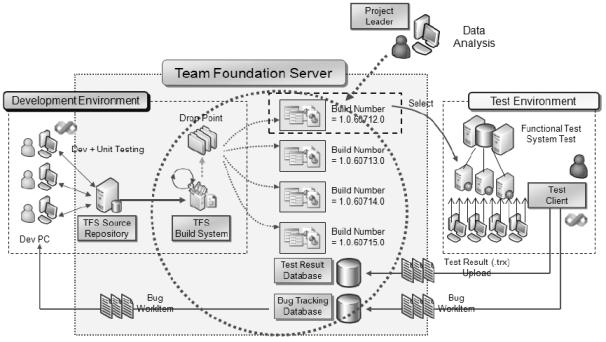
TFS enables a development team to store code in a centrally managed source code repository. You can create builds from this repository by using the build server and you can then distribute these builds to your test team.

Fig : Team Foundation Server Logical Workflow
The test team picks up builds from a drop location and runs them through its testing environment by performing a combination of manual and automated tests. Test results are stored by TFS and are used to provide feedback on the build quality. The test team can also create work items and bugs (a specific type of work item) on which the development team needs to take action. These work items allow the test team to track the work of the development team.
TFS are designed to support the software development life cycle by integrating various aspects of software development such as source control, work tracking, reporting, project management, and automated build process.

Wednesday, December 29, 2010

Torrent / BitTorrent

What is Torrent?
    Torrent is a highly popular peer-to-peer file-sharing activity that allows participants to send and receive files from other computers. All torrenting takes place using a torrent program. Examples of torrenting programs include uTorrent, Azureus and the original BitTorrent. These programs allow your computer to send and receive files on a specific port and interpret the data from .TORRENT files. Torrent is a small file (around few kilobytes) with the suffix .torrent, which contains all the information needed to download a file the torrent was made for. That means it contains file names, their sizes, where to download from and so on.

What is BitTorrent?
    BitTorrent is an open source peer-to-peer protocol for downloading files on the internet. Consequently there are several free BitTorrent programs available to the public, each with differing features. The original source code was written by Bram Cohen. The idea behind BitTorrent is to allow massive distribution of popular files without penalizing the source by soaring bandwidth costs and possible crashes due to demand that exceeds the capability of the server.
    BitTorrent creates a different networking scheme. It uses the other clients who are also downloading the file to effectively act as servers to one another, simultaneously uploading the parts of the file received to others requesting the file. Hence, when you click on a file to download, several connections will be made to receive "slices" of the file that combine to create the entire file. Meanwhile, as you are downloading these "slices" you are also uploading them to anyone else that needs the parts you are receiving. Once the entire file is received it is considered polite to keep your client connected to act as a seed. A seed refers to a source that has the entire file available. In this way BitTorrent relieves the burden of the servers but more significantly it makes it possible for anyone to disseminate a file quickly and easily without requiring expensive servers or an infrastructure of distribution. If the demand is there, the file will spread.

Thursday, December 23, 2010

Extreme Programming

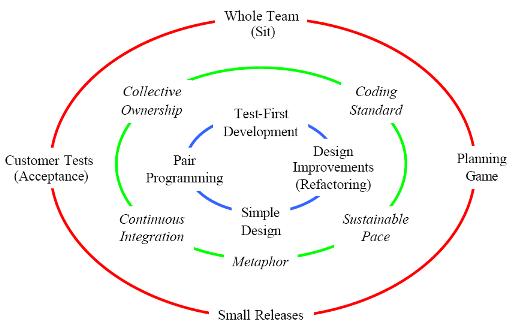
Extreme Programming (XP) is the most widely used agile methodology. XP is a discipline of software development based on values of simplicity, communication, feedback, and courage. It works by bringing the whole team together in the presence of simple practices, with enough feedback to enable the team to see where they are and to tune the practices to their unique situation.

In Extreme Programming, every contributor to the project is a member of the “Whole Team”, a single business/development/testing team that handles all aspects of the development. Central to the team is the “Customer”, one or more business representatives who sit with the team and work with them daily.

Extreme Programming teams use a simple form of planning and tracking to decide what to do next and to predict when any desired feature set will be delivered. Focused on business value, the team produces the software in a series of small fully integrated releases that pass all the
tests that the Customer has defined. The core XP practices for the above are called Whole Team, Planning Game, Small Releases, and Acceptance Tests.

Extreme Programmers work together in pairs and as a group, with simple design and obsessively tested code, improving the design continually to keep it always just right for the current needs. The core XP practices here are Pair Programming, Simple Design, Test-Driven
Development, and Design Improvement.

The Extreme Programming team keeps the system integrated and running all the time. The programmers write all production code in pairs, and all work together all the time. They code in a consistent style so that everyone can understand and improve all the code as needed. The additional practices here are called Continuous Integration, Team Code Ownership, and Coding Standard.

The Extreme Programming team shares a common and simple picture of what the system looks like. Everyone works at a pace that can be sustained indefinitely. These practices are called Metaphor, and Sustainable Pace. 
 
Fig : XP Practices and the Circle of Life

Wednesday, December 15, 2010

SQL Server 2008 : Policy-Based Management

Policy-Based Management is a new feature in SQL Server 2008 that allows users to define and implement policies across SQL Server infrastructure. Group Policy offers centralized management and configuration of systems, applications, and users via administrator or system-controlled policies, which can then be applied at various levels of managed directory structure. Policy-Based Management adheres to those same principles as Group Policy, in that you can apply a policy against a target (such as a database, table, or stored procedure) and evaluate whether the target complies with your policy. If your target does not adhere to your policy, you can either enforce compliance with that policy or trigger an alert to let an administrator know about the policy violation. You can set up your policy to actively deny any nonconforming actions, or choose to simply log such actions.
Policy-Based Management Components
    There are mainly three components : Policies, Conditions, and Facets. Facets are required in order to create conditions, and conditions are required in order to create policies. Additionally, policies are applied to the targets you specify.
Facets
A facet is a group of logical properties that are related to each other within the context of the specified target. SQL Server 2008 exposes 74 facets, each with one or more properties. This allows you to leverage hundreds of properties in order to create policies.
Conditions
A condition is a specified required state for the policy or facet being evaluated. Basically, a policy checks the condition of a target. If the target does not comply with the specified condition, the policy fails. A policy can evaluate only one condition, but user can evaluate one or more properties within a single condition.
Policies
A policy is a complete package that includes conditions, facets, targets, evaluation modes, and server restrictions. Policies are stored within the msdb system database. Policies can be exported from database and stored in XML format. This portability allows administrators to easily share and compare custom policies.
Targets
Targets are the objects that are managed by a policy. Targets can refer to many objects: servers, databases, instances, stored procedures, and so on. Policies can contain multiple targets. The available targets change depending on the context of the policy.

Monday, October 25, 2010

C# Essentials

Some self explanatory C# fundamentals diagrams:
Introducing C#:

Data Types:

Operators and Control Flow:

Method and Parameters:

Classes:

Inheritance:

Interfaces:

Value Types:

Well-Formed Types:

Exception Handling:

Generics:

Delegates and Lambda Expressions:

Events:

Collection Interfaces with Standard Query Operators:

LINQ with Query Expressions:

Custom Collections:

Reflection, Attributes, and Dynamic Programming:

Multithreading:

Synchronization and More Multithreading Patterns:

Platform Interoperability and Unsafe Code:

The Common Language Infrastructure:

Friday, October 22, 2010

High Level Component of SQL Server Architecture

SQL Server is split into two main engines: the Relational Engine and the Storage engine.


The Relational Engine:
    The relational Engine is also sometimes call the query processor because its primary function is query optimization and execution. It contains a Command Parser to check query syntax and prepare query trees, a Query Optimizer that is arguably the crown jewel of any database system, and a Query Executor responsible for execution.
1. Command Parser:
The Command Parser’s role is to handle T-SQL language events. It first checks the syntax and returns any errors back to the protocol layer to send to the client. If the syntax is valid, then the next step is to generate a query plan or find an existing plan. A Query plan contains the details about how SQL Server is going to execute a piece of code. It is commonly referred to as an execution plan.
Plan Cache: Creating execution plans can be time consuming and resource intensive, so The Plan Cache, part of SQL Server’s buffer pool, is used to store execution plans in case they are needed later.
2. Query Optimizer:
    The Query Optimizer is one of the most complex and secretive parts of the product. It is what’s known as a “cost-based” optimizer, which means that it evaluates multiple ways to execute a query and then picks the method that it deems will have the lowest cost to execute. This “method” of executing is implemented as a query plan and is the output from the optimizer.
3. Query Executor:
    The Query Executor’s job is self-explanatory; it executes the query. To be more specific, it executes the query plan by working through each step it contains and interacting with the Storage Engine to retrieve or modify data.
The Storage Engine:
    The Storage engine is responsible for managing all I/O to the data, and contains the Access Methods code, which handles I/O requests for rows, indexes, pages, allocations and row versions, and a Buffer Manager, which deals with SQL Server’s main memory consumer, the buffer pool. It also contains a Transaction Manager, which handles the locking of data to maintain Isolation (ACID properties) and manages the transaction log.
1. Access Methods:
    Access Methods is a collection of code that provides the storage structures for data and indexes as well as the interface through which data is retrieved and modified. It contains all the code to retrieve data but it doesn’t actually perform the operation itself; it passes the request to the Buffer Manager.
2. Buffer Manager:
    The Buffer Manager manages the buffer pool, which represents the majority of SQL Server’s memory usage. If you need to read some rows from a page the
Buffer Manager will check the data cache in the buffer pool to see if it already has the page cached in memory. If the page is already cached, then the results are passed back to the Access Methods. If the page isn’t already in cache, then the Buffer Manager will get the page from the database on disk, put it in the data cache, and pass the results to the Access Methods.
Data Cache: The data cache is usually the largest part of the buffer pool; therefore, it’s the largest memory consumer within SQL Server. It is here that every data page that is read from disk is written to before being used.
3. Transaction Manager:
    The Transaction Manager has two components that are of interest here: a Lock Manager and a Log Manager.
The Lock Manager is responsible for providing concurrency to the data, and it delivers the configured level of isolation by using locks. The Access Methods code requests that the changes it wants to make are logged, and the Log Manager writes the changes to the transaction log. This is called Write-Ahead Logging.
The Protocol Layer:
When the protocol layer in SQL Server receives your TDS (Tabular Data Stream) packet, it has to reverse the work of the SNI at the client and unwrap the packet to find out what request it contains. The protocol layer is also responsible for packaging up results and status messages to send back to the client as TDS messages.
TDS (Tabular Data Stream) Endpoints: TDS is a Microsoft-proprietary protocol originally designed by Sybase that is used to interact with a database server.
Tuesday, September 21, 2010

Dynamic Programming


Dynamic Programming is method of solving complex problems by breaking them down into a series of overlapping sub-problems, and build up solutions to larger and larger sub-problems.
    It is a powerful design technique that can be used to solve problems of computational nature. And it is typically applied to optimization problems.

Keys of Dynamic Programming:
1. Optimal substructure
    An optimal solution to a problem (instance) contains optimal solutions to subproblems.
2. Overlapping subproblems
    A recursive solution contains a “small” number of distinct subproblems repeated many times.
3. Bottom Up Fashion
    Computing the solution in a bottom-up fashion to solve the problem.

Areas:
  • Bio-informatics
  • Control theory
  • Information theory
  • Operations research
  • Computer science: theory, graphics, AI, systems
Some famous dynamic programming algorithms:
  • Unix diff for comparing two files
  • Viterbi for hidden Markov models
  • Smith-Waterman for sequence alignment
  • Bellman-Ford for shortest path routing in networks
  • Cocke-Kasami-Younger for parsing context free grammars